Help topics
Paying for My Skyro Loans
Product Loan
- What is a Skyro Product Loan?
- How do I apply for a Skyro Product Loan?
- Where can I use my Skyro Product Loan?
- Product Loan payments and fees
- Product Loan application status
- What is Skyro Flexi?
- What is the Skyro Zero Plan?
- Add-ons and Protection
- Got questions about Skyro Product Loan, boss?
- What items can I buy with a Skyro Product Loan?
SkyroCredit
- What is SkyroCredit?
- How to use SkyroCredit
- Refer and Earn
- Cash out
- QR Ph payments with SkyroCredit
- Credit limit
- Payments
- Billing cycles and statements
- Interest rates and fees
- Cashback in SkyroCredit
- Using SkyroPondo for SkyroCredit
- SkyroCredit application status
- Payment issues with SkyroCredit
- Got questions about SkyroCredit, boss?
Cashback in SkyroCredit
How do I earn cashback?
Every SkyroCredit purchase earns you 1% cashback. For example, spend ₱1,000, get ₱10 back.
₱1 cashback = ₱1 off, like a discount!
It's automatically added to your cashback balance in the app, just look for the blue rocket icon on the top right of your home screen.
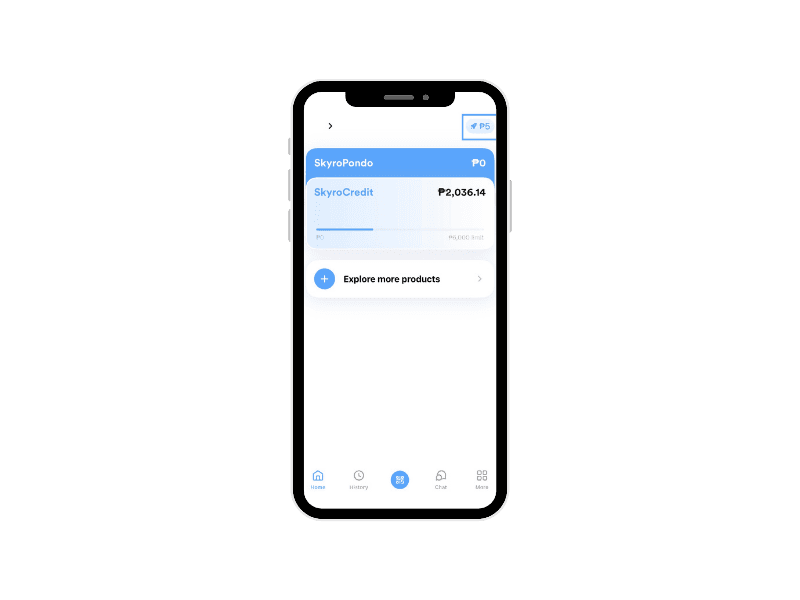
Note that if your purchase is below ₱100, it will not earn cashback, boss.
Example:
- ₱59 → no cashback
- ₱199 → ₱1 cashback
How do I use my cashback?
You can start using it once you reach ₱100, and earn up to ₱500 total. After that, earning pauses until you use it.
Just tap to apply it when paying with SkyroCredit — it won't be used automatically unless you choose to.
₱1 cashback = ₱1 off, so it works just like a discount.
If the amount you're paying is more than your cashback, the rest will be paid using your SkyroCredit limit.
- Example A: If you have 100 cashback points and make a ₱50 purchase → cashback will cover ₱50.
- Example B: If you have 100 cashback points and make a ₱200 purchase → cashback will cover ₱100, and ₱100 will be charged to your credit limit.
Note: You cannot choose how much cashback to use, boss. The system always applies the maximum available cashback up to the purchase amount.
Can I use cashback to pay my loan?
Cashback works like your credit limit, boss. It’s for purchases only, not for loan repayments.
What is the monthly cashback earning limit?
The monthly cashback earning limit is 5% of your credit limit (based on your previous credit limit if you have already received a limit increase). This resets every 1st of the month.
Examples:
- ₱2,000 limit → ₱100 cashback max/month
- ₱5,000 limit → ₱250 cashback max/month
- ₱6,000 limit → ₱300 cashback max/month
- ₱10,000 limit → ₱500 cashback max/month
When is cashback credited?
Cashback usually appears immediately after your purchase. If you don’t see it, try refreshing the Transactions screen on the Skyro app, boss.
Still missing? Please chat with us in the Skyro app so we can help you right away, boss!
Can cashback cover 100% of my purchase?
Yes, if your cashback points are equal to or greater than the purchase amount.
Can I lose my cashback?
If your account is overdue by more than 5 days, all your earned cashback will be cancelled. So it’s important to avoid getting overdue, boss!