Help topics
Paying for My Skyro Loans
Product Loan
- What is a Skyro Product Loan?
- How do I apply for a Skyro Product Loan?
- Where can I use my Skyro Product Loan?
- Product Loan payments and fees
- Product Loan application status
- What is Skyro Flexi?
- What is the Skyro Zero Plan?
- Add-ons and Protection
- Got questions about Skyro Product Loan, boss?
- What items can I buy with a Skyro Product Loan?
SkyroCredit
- What is SkyroCredit?
- How to use SkyroCredit
- Refer and Earn
- Cash out
- QR Ph payments with SkyroCredit
- Credit limit
- Payments
- Billing cycles and statements
- Interest rates and fees
- Cashback in SkyroCredit
- Using SkyroPondo for SkyroCredit
- SkyroCredit application status
- Payment issues with SkyroCredit
- Got questions about SkyroCredit, boss?
How to use QR Ph in Skyro
In this article
Using QR Ph in the Skyro app
Follow these steps to use QR Ph in the Skyro app:
- Open the Skyro app
- Tap the QR icon on the home screen
- Scan a QR Ph code at the store or tap Upload QR Ph to upload a saved QR image
- Confirm the amount and pay
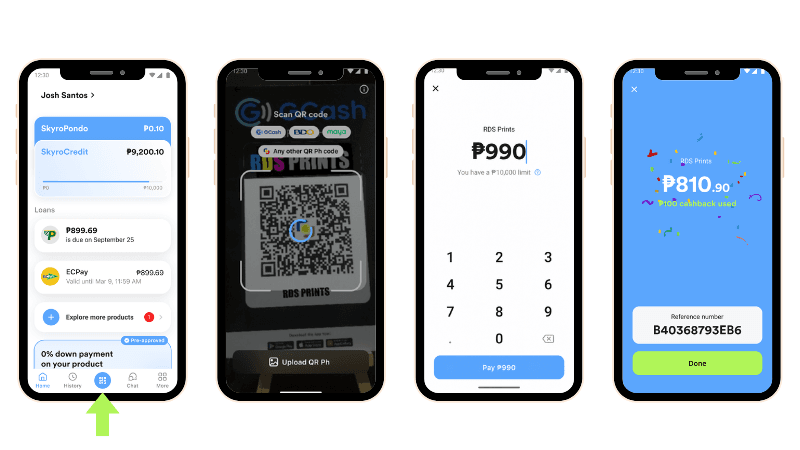
How do I scan a QR Ph code?
To scan a QR Ph code, open your Skyro app and tap the QR icon on the home screen, boss!
Which Skyro products support QR Ph payments?
SkyroCredit can be used to pay for any purchase as long as QR Ph payment is accepted, boss.
Are there any fees when using QR Ph?
There are no fees to scan a QR Ph code using SkyroCredit, boss!